Azure SQL Managed Instance Link Feature in SQLServer 2022
Azure SQL Managed Instance Link Feature in SQLServer 2022

Azure SQL Managed Instance link feature, enables near real-time data replication between SQL Server and Azure SQL Managed Instance(MI). This unlocks scaling of read-only workloads, offloading analytics and reporting to Azure, and migrating to Azure. In SQL Server 2022, with this link you can setup online disaster recovery with fail back to SQL Server as well as configuring the link from SQL Managed Instance to SQL Server 2022 .
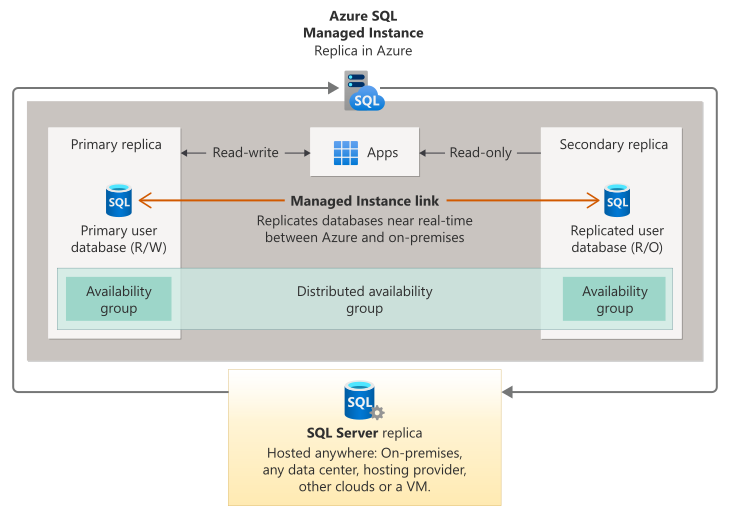
Link feature leverages Distributed Availability Group (DAG) for replicating data hosted in SQL Server anywhere to Azure SQL MI. It is possible to replicate multiple databases from a single instance of SQL Server to one or more SQL managed instances, or replicate the same database to multiple SQL managed instances, by configuring multiple links — one link for each database to managed instance pair.
Architecture
Below is a high-level architecture of Azure SQL Managed Instance link
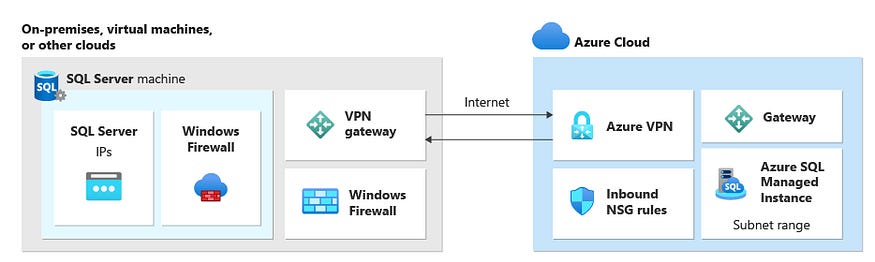
Databases that are replicated through the link between SQL Server and Azure SQL Managed Instance can be used for several scenarios, such as:
Disaster recovery
Using Azure services without migrating to the cloud
Offloading read-only workloads to Azure
Migrating to Azure
Copying data on-premises
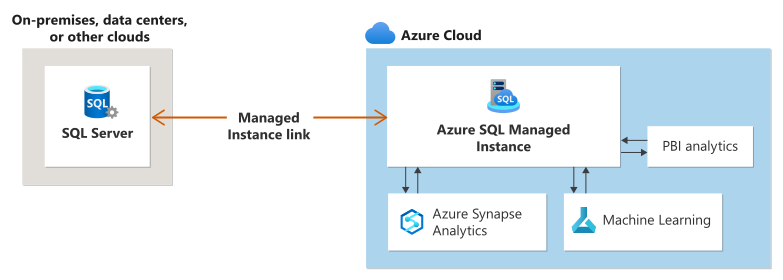
The underlying technology behind the link feature for SQL Managed Instance is based on creating a distributed availability group between SQL Server and Azure SQL Managed Instance. The solution supports single-node systems with or without existing availability groups, or multiple node systems with existing availability groups.
Disaster recovery
The Managed Instance link enables disaster recovery where, in the event of a disaster, you can manually fail over your workload from your primary to your secondary.
With SQL Server 2016, and SQL Server 2019, the primary is always SQL Server and failover to the secondary managed instance is one-directional. Failing back to SQL Server isn't supported. However, it's possible to recover your data to SQL Server using data movement options such as replication or bacpac export/import.
With SQL Server 2022, either SQL Server or SQL Managed Instance can be the initial primary and you can establish the link from either SQL Server or SQL Managed Instance. You can fail back your workloads between the primary and secondary, achieving true two-way disaster recovery.
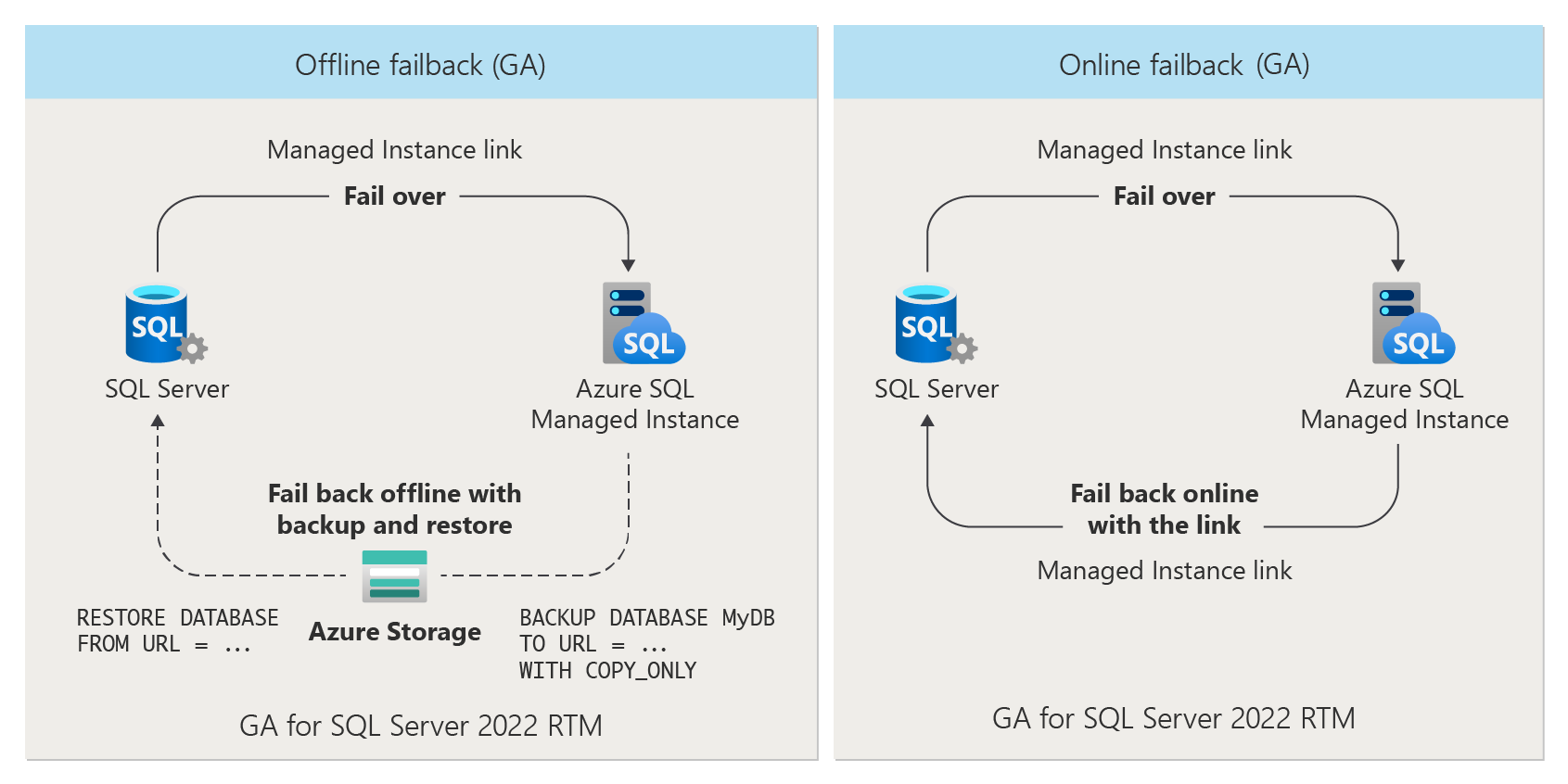
When failing back to SQL Server, you can choose to fail back:
online by using the Managed Instance link directly.
offline by taking a backup of your database from SQL Managed Instance and restring it to SQL Server 2022 instance .
Limitations
SQL Server versions 2008 to 2014 aren't supported by the link feature, as the SQL engine of these releases doesn't have built-in support for distributed availability groups required for the link. Upgrade to a newer version of SQL Server to use the link.
Data replication and failover from SQL Managed Instance to SQL Server 2022 is not supported by instances configured with the Always-up-to-date update policy. Your instance must be configured with the SQL Server 2022 update policy to do the following:
Establish a link from SQL Managed Instance to SQL Server.
Fail over from SQL Managed Instance to SQL Server 2022.
While you can establish a link from SQL Server 2022 to a SQL managed instance configured with the Always up to date update policy after failover to SQL Managed Instance, you will no longer be able to replicate data or fail back to SQL Server 2022.
Only user databases can be replicated. Replication of system databases isn't supported.
The solution doesn't replicate server-level objects, agent jobs, or user logins from SQL Server to SQL Managed Instance.
For SQL Server versions 2016 and 2019, replication of user databases from SQL Server instances to SQL Managed Instance deployments is one way. User databases from SQL Managed Instance deployments can't be replicated back to SQL Server instances. Two-way replication with failback to a SQL Server instance is available only for SQL Server 2022.
Databases with multiple log files can't be replicated, because SQL Managed Instance doesn't support multiple log files.
Only one database can be placed into a single availability group for one Managed Instance link. However, it's possible to replicate multiple databases in a single SQL Server instance by establishing multiple links
If you're using Transparent Data Encryption (TDE) to encrypt SQL Server databases, the database encryption key from SQL Server needs to be exported and uploaded to Azure Key Vault, and you need to also configure the TDE option on SQL Managed Instance before creating the link.
SQL Managed Instance databases that are encrypted with service-managed TDE keys can't be linked to SQL Server. You can link an encrypted database to SQL Server only if it was encrypted with a customer-managed key and the destination server has access to the same key that's used to encrypt the database.